Resources
Introducing Undo AI: Runtime Context for Coding Agents
Undo Suite 10.0 is here. This is the most significant release in our history, because it introduces Undo AI. Built to give coding agents the runtime context they need, Undo AI enables engineering teams to solve the hardest problems in the most complex codebases.
Now, your AI agent can reach past the source and into the runtime. It can see the values your program produced, the paths it actually took, and the order in which things happened. The result is fully automated root-cause analysis on code that, until now, agents could only guess at.
Undo AI works with all the popular coding agents, including Claude Code, Codex, Cursor, GitHub Copilot, and more.

In this article, we explain what shipped in 10.0, why it matters, and what it changes for engineers and the management team accountable for what their software does.
What’s new in Undo 10.0?
The headline is Undo AI. There are two ways to use it.
From your AI agent – Undo 10.0 ships with an MCP server that any compatible agent can drive. Once it’s configured, your agent decides on its own when to investigate a recording and which tools to call, meaning you keep working exactly as you do now. There’s nothing hosted to connect to and nothing to deploy: the server runs on the same machine as your code and runs as a local subprocess of your agent. Setup is a single command or a few lines of config, and we ship ready-to-use configurations for Claude Code, Codex, Cursor, Gemini CLI, GitHub Copilot, Kiro, Roo Code, and more.
In UDB – Load a recording in UDB, our time travel debugger, and use the new ai command to ask questions inline, such as “why did this program crash?” and “where did this value come from?” The answer will be given in the same session.
Alongside Undo AI, 10.0 brings improvements across the board. Recordings are now around 30% smaller thanks to zstd compression, making them cheaper to store, share and move. In the Undo Team and Undo OEM Editions, better snapshot placement in LiveRecorder recordings means faster replay when moving back through execution history. Find out more here.
AI = Model + Context
There’s a quiet assumption behind most conversations about AI in software: that the models are the bottleneck. That if we just wait for the next, smarter model, the hard problems will fall.
The models are extraordinary, and they keep getting better. But on a large, complex, real-world codebase, raw intelligence isn’t what’s missing. Context is.
A coding agent reasons brilliantly about static code, including the structure, the syntax and the intent on the page. But what it can’t see is the dynamic behavior: the execution paths a program took under a specific input, the state that changed three modules away from where the symptom appeared, the value that was already wrong long before anything crashed. Source code tells you what could happen. It doesn’t tell you what did.
So when an agent meets a problem that lives in runtime state, it does the only thing it can. It fills the gap with a plausible guess. Sometimes the guess is right. Often it’s confident and wrong. And confidence is not correctness.
This isn’t a gap in the model’s intelligence. It’s a gap in its context. That’s the whole idea behind how we think about AI performance:
AI = Model + Context
The model half of that equation is improving on its own, faster than any of us can keep up with. The context half is the part that’s been left behind. Runtime context is how you close it.
What a recording gives an agent
Undo’s answer to the context problem is the recording. A recording is a deterministic capture of complete program execution. The recording contains full control flow and data flow, within and across every module, as the program actually ran.
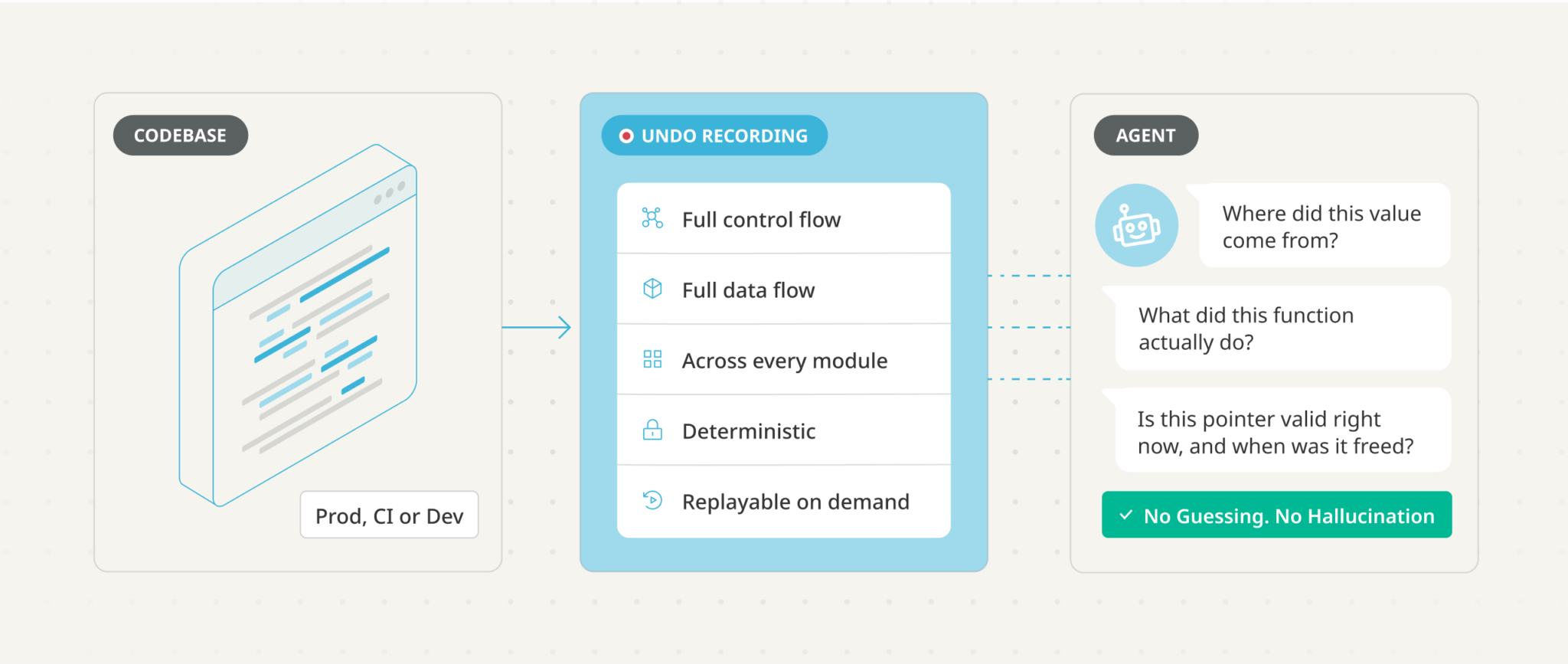
A recording isn’t a log and it isn’t a stack trace. It’s the program’s execution, captured in full and replayable on demand. Because it’s deterministic, an agent can investigate it as many times and as many ways as it needs to, and get a true answer every time. Because it’s self-contained and portable, a recording captured in production can be analyzed anywhere: on a developer’s machine, in CI, on a different continent, without reproducing the original conditions.
When an agent has a recording, it stops guessing and starts asking questions of the truth:
- Where did this value come from? The agent traces an expression back to the moment it last changed, then back again to whatever wrote it, walking the chain of causality directly through the execution instead of inferring it from the code.
- What did this function actually do? The agent reconstructs a detailed, log-like trace of a call (arguments, return values, branches taken, assignments) after the fact, with no source changes, no rebuild, and no disturbance to the timing that produced the behavior in the first place.
- Is this pointer valid right now, and when was it freed? Lifetime tracking follows the program’s allocator across the entire execution, so use-after-free and double-free problems that are painful to chase by hand become a direct question with a direct answer.
Crucially, the model never sees raw recording data. It sees the responses of Undo’s tools, designed to summarize what the program did in a form an LLM can reason about. And the tool surface is deliberately opinionated: it doesn’t offer the agent breakpoints, and it doesn’t offer forward execution. We found that agents over-set breakpoints and lose the thread, and that given the choice they over-rely on stepping forwards. Removing those options nudges the agent toward the kind of investigation that actually works on a recording.
Undo AI even spawns a fresh sub-agent to challenge the main investigation’s conclusion before it reaches you. This is because agents have a tendency to stop at the first plausible explanation rather than the real one.
What it changes, depending on where you sit
The reason this release matters to more than just the engineer at the keyboard is that the same capability answers a different question for everyone who depends on the code.
For engineers, it’s the end of guesswork on the problems that used to swallow whole afternoons. The hardest bugs in a large codebase live in runtime state that logs don’t capture. Often they only appear intermittently, whether in production, in CI, or under test. With a recording, the agent investigates the actual execution and brings back an explanation grounded in what happened. And it leaves its reasoning in the recording as bookmarks you can jump to and verify.
For engineering managers, it’s a measurable step-change in how fast complex problems get resolved, and it cuts the cost of running AI. Distilled, relevant context doesn’t just let an agent solve problems it otherwise couldn’t. It lets the agent solve problems with dramatically fewer tokens, and often on a cheaper model than the job would otherwise demand. At Palo Alto Networks, fully automated root-cause analysis brought time to resolution down by 100x.
For directors and VPs of engineering, it’s about deploying agents on your core systems rather than toy tasks. An AI can’t be accountable for what it ships; only a human can. Recordings give the human in the loop full visibility into exactly what agent-generated code did and how it worked, so your engineers can review, own and stand behind it. That’s what makes agentic development safe to adopt where the stakes are highest: where outages and security breaches are the failure mode, and where a codebase that becomes impossible to maintain is an existential risk, not an inconvenience.
This is why engineering teams at NVIDIA, AWS, Bloomberg and Palo Alto Networks rely on Undo on some of the most demanding software in the world.
Your data and your IP stay with you
One more thing matters to everyone in that list, and it’s worth stating plainly. When you use Undo from your AI agent, all traffic stays between your machine and the LLM provider your agent is already configured to use. Undo’s servers are not in the loop. Anything you would already share with your AI agent, and only that, is what’s shared. There’s no new vendor in the path of your source code.
How can I try Undo AI?
Undo AI is available now in Undo Suite 10.0 for C, C++, Go and Rust, and Undo Suite 9.2 for Java. AI features require a license that has them enabled; if you’re an existing customer and the ai command or the undo mcp server tells you AI is disabled, we’ll get you upgraded.
The fastest way to understand what runtime context does for your agents is to see it work on code that looks like yours.