
Resources
Integrating AI Agents Dedicated to Debugging in Your Engineering Workflow
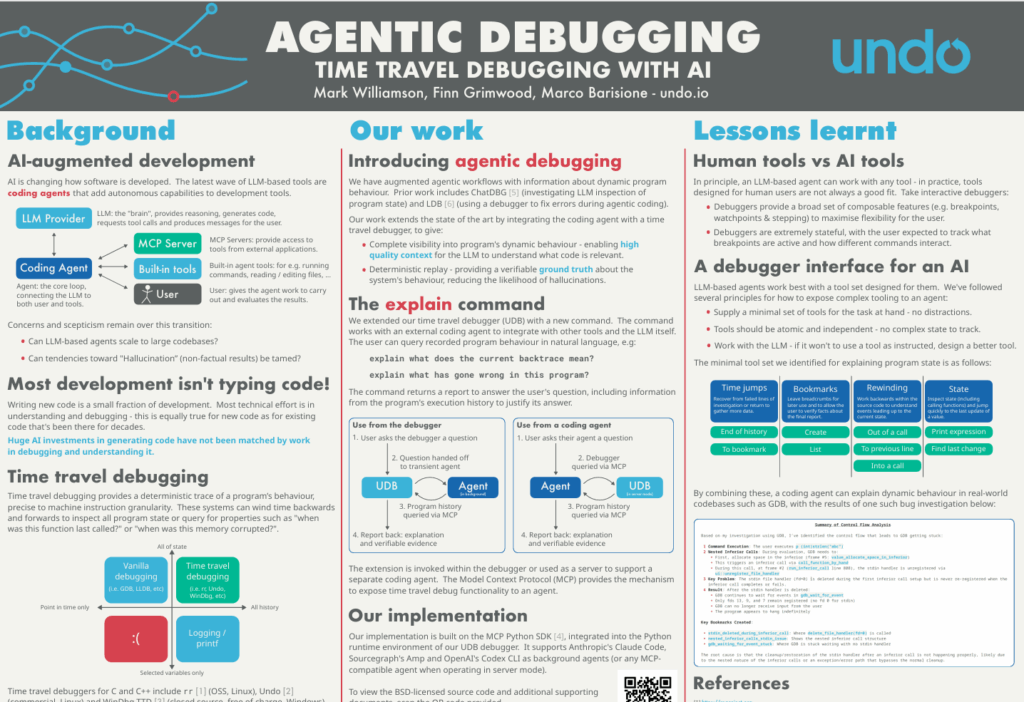
At the CppCon 2025 conference, Undo’s CTO Mark Williamson introduced agentic debugging in a poster session. This article provides a high-level overview for software engineering leaders exploring AI-augmented software engineering.
AI augmented software engineering
LLM-based coding agents are transforming software engineering by adding autonomous capabilities to development tools.
But there’s a problem… and it comes in the form of LLM hallucination. AI that hallucinates doesn’t inspire trust. For engineers, unreliable answers are worse than no answers — and that’s why adoption can lag behind.
Most development is not typing code!
Writing new code is a small fraction of software development. Most engineering effort goes into understanding code flow and debugging tough issues.
Yet while billions have been invested in AI for code generation, far less has gone into debugging and code understanding — where engineers spend most of their time (and where the work is most painful!)
Introducing agentic debugging
LLM hallucination is caused by the lack of high-quality context. When the software does something unexpected, telling it to read the code or look at logs is basically insufficient to give it the guardrails it needs to stay on track. That kind of agentic debugging is doomed to fail.
Undo proposes a different approach based on its core time travel debugging technology.
This is how it works:
- RECORD: An engineer (or your CI system) captures the exact program execution (every instruction, threads, variables, I/O) into a recording file. That provides a deterministic trace of a program’s behavior down to machine instruction granularity.
- REPLAY: The engineer then steps backward and forward in the recording – which is loaded up in the Undo debugger (UDB) – to inspect code flow and see what the software actually did during the failed run.
The recording is the key because it provides dynamic behavioral data that one cannot get from a static log or just reading the code.
By feeding your AI coding assistant the recording of the program’s execution, it now has the high-quality context it needs to accurately and autonomously carry out root cause analysis.
- The AI agent now has complete visibility into the program’s dynamic behavior and so it can now understand what code is actually running during the failed run and what code is not running.
- The deterministic replay provides a verifiable ground truth about the system’s behavior, reducing the likelihood of hallucination.
How it works
We’ve currently implemented two pieces of functionality:
- An MCP server: it exports the functionality of our time travel debugger for use by an AI agent, allowing it to integrate into existing AI workflows including VS Code Copilot or Cursor.
- The
explaincommand: it brings AI into the time travel debugging environment (the UDB debugger) by providing tight integration with terminal-based coding agents such as Claude Code, Sourcegraph’s Amp or OpenAI’s Codex CLI. With theexplaincommand, an engineer can query a recording in natural language e.g. “explain what has gone wrong in this program”, let the AI investigate autonomously, and come back to find their answer.
Take a deeper dive into the poster below.
Watch agentic debugging in action
Get in touch if you’d like to get your hands on the tech